Architecting the "Micro-Webinar" Stack (death of the mega webinar broadcast)
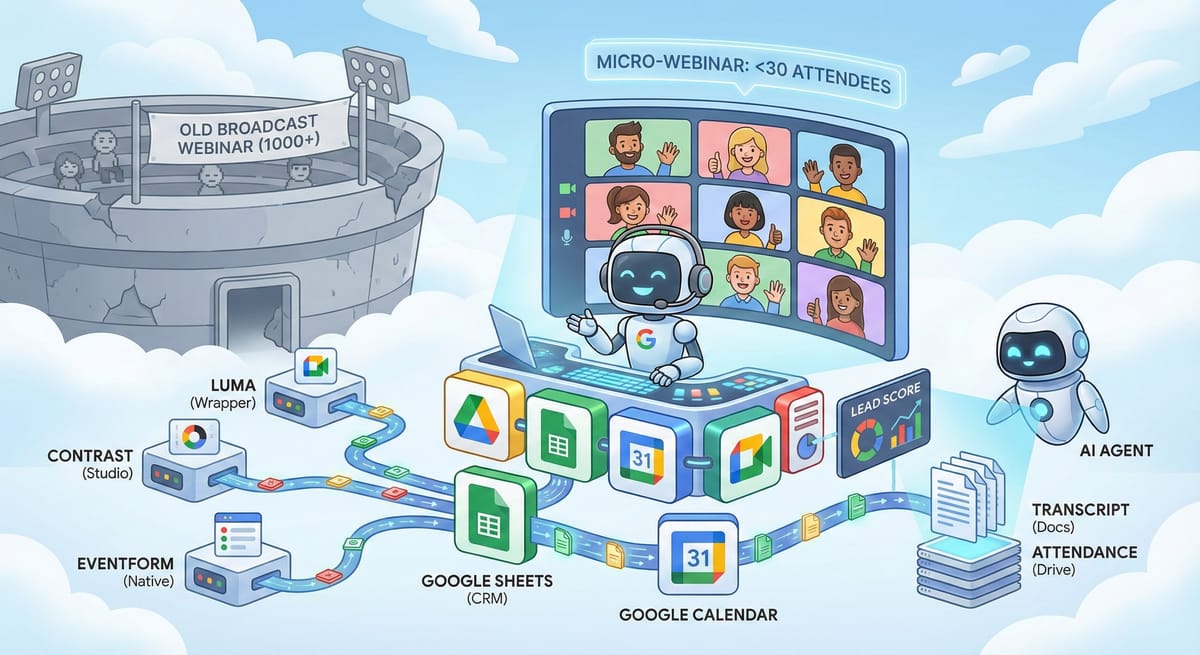
30 is the New 1,000
The era of the massive, broadcast-style webinar is ending. Conversion rates are plummeting as "Zoom fatigue" and passive participation degrade lead quality. In large-scale webinars (100+ attendees), the "Bystander Effect" dominates: attendees feel anonymous, engagement drops, and the psychological pressure to convert is non-existent.
The market is shifting to the "Micro-Webinar": high-fidelity, intimate sessions capped at 30 attendees. These aren't broadcasts; they are group sales demonstrations. In a cohort of 30, anonymity evaporates. Every attendee is visible on the grid, creating a high-intent environment where social proof drives conversion.
For organizations running on Google Workspace ("Google Shops"), this creates a friction point. Google Meet is the superior, low-latency transport layer—ubiquitous and browser-based—but it historically lacks the "event management" layer (registration, emails, analytics) of specialized platforms like Zoom or Teams.
We analyzed the current landscape to solve this. Here is the "So What" for your stack.
Path 1: The "Lean" Wrapper Economy (For Marketing Leaders)
If you need speed, aesthetics, and reduced administrative overhead, do not use raw Google Meet. Use a "Wrapper"—a tool that handles the registration page, email cadence, and calendar logistics while outsourcing the video transmission to Meet or a lightweight browser studio.
1. The Brand Play: Luma (lu.ma)
- The "Why": Luma excels at reducing "anxiety administration." It automates the entire confirmation loop (calendar invites, 1-hour reminders) and handles time zone conversion automatically, which drastically reduces support queries for distributed audiences.
- Best for: Aesthetics and community building. If you want your event to feel like a Silicon Valley tech meetup rather than a corporate training, Luma’s visual-first registration pages are best-in-class.
- The Trade-off: It looks great, but data is siloed. While Luma captures registrations, the automated sync to Google Sheets (your CRM source of truth) is often gated behind a paid "Plus" subscription.
- Verdict: Use this if brand perception is your primary KPI.
2. The Studio Play: Contrast (getcontrast.io)
- The "Why": Contrast is a "studio" in the browser. Unlike Meet, it allows for on-screen branding, lower-thirds, and professional layouts without requiring software downloads. It also features "Repurpose AI," which automatically slices your webinar into social clips—automation that Google Meet simply cannot provide.
- The Alpha: Their free tier is uniquely aligned with the micro-webinar thesis: it allows up to 30 attendees per event with full enterprise features (branding, analytics) for $0.
- The Trade-off: It’s a separate video platform, not a Meet wrapper. You lose the familiarity of the Google interface.
- Verdict: The highest-value tool for small cohorts where "production value" equals trust.
3. The Native Play: EventForm
- The "Why": EventForm is an "invisible" platform. It operates as a Google Workspace Add-on that injects event logic directly into Google Forms.
- The Mechanism: A user submits a Google Form → EventForm adds them to a Calendar Event → The Calendar Event contains the Google Meet link.
- The "Zero-Zapier" Advantage: Because it lives inside the Google ecosystem, data synchronization to Google Sheets is instant and native. There is no middleware to break and no API limits to hit.
- Verdict: Zero friction, low cost, instant data sync. Best for internal workshops or pragmatic teams who value data liquidity over design.
4. The Scheduler Hack: TidyCal
- The "Why": Primarily a booking tool, TidyCal offers a "Group Booking" feature that can be hacked for webinars. You simply set a capacity limit of 30 for a specific time slot.
- The ROI: Unlike SaaS subscriptions that bleed budget, TidyCal offers a lifetime deal. It handles the calendar invites and capacity enforcement autonomously using your existing Google Meet connection.
- Verdict: The most cost-effective long-term solution for solo practitioners who view webinars as "scheduled meetings" rather than "events."
Path 2: The "Agentic" Architecture (For GTM Engineers)
If you are going to score leads, analyze sentiment, and automate follow-ups, do not use third-party tools. They create data silos that agents cannot easily access. You need a "Google Native" architecture where every interaction is a Workspace object.
1. Data Sovereignty & The Object Model
In a third-party model (e.g., Zoom), the registration data lives in one database and the attendance data in another. Bridging them requires complex API calls.
In the Google Native Stack, the entire lifecycle is unified:
- Registration is a row in a Google Sheet.
- The Event is a Calendar Object.
- Attendance is a CSV file in Google Drive.
- The Transcript is a Google Doc.
- Agent Access: Your AI agents can read a Google Doc transcript or a Sheets row instantly via standard file system permissions. They do not need to query a proprietary API or wait for a webhook.
2. The Control Plane: "Audio Lock" vs. "Mute All"
A primary fear of moving from "Webinar" software to "Meeting" software is loss of control. Google Meet has solved this with Host Management.
- The Distinction: "Mute All" is temporary; users can unmute themselves. "Audio Lock" is architectural; it prevents participants from unmuting entirely.
- The Workflow: You can pre-configure the Calendar event to start with Audio Lock ON. This allows you to replicate a broadcast-style pitch for the first 20 minutes, then toggle the lock OFF for a high-intimacy Q&A session. This dynamic flexibility is superior to the rigid "Panelist vs. Attendee" hierarchy of legacy platforms.
3. Real-Time vs. Latency
The one trade-off with the native stack is latency. Google Meet generates attendance reports and transcripts after the meeting concludes. While this prevents real-time notifications when a VIP joins, it provides a robust, file-based trigger for post-event processing.
The Bottom Line (WIFM)
- Marketing: Stop paying for 500-seat Zoom Webinar licenses for 25-person events. You are paying for capacity you don't use and complexity you don't need. Switch to Contrast for external polish or EventForm for internal speed.
- Engineering: If you are building agent based systems internally, then consider building on the Native Google Stack.
Thanks for reading and good luck on your next broadcast, I mean webinar!
Troy