Data Tables inside n8n signal a phase shift
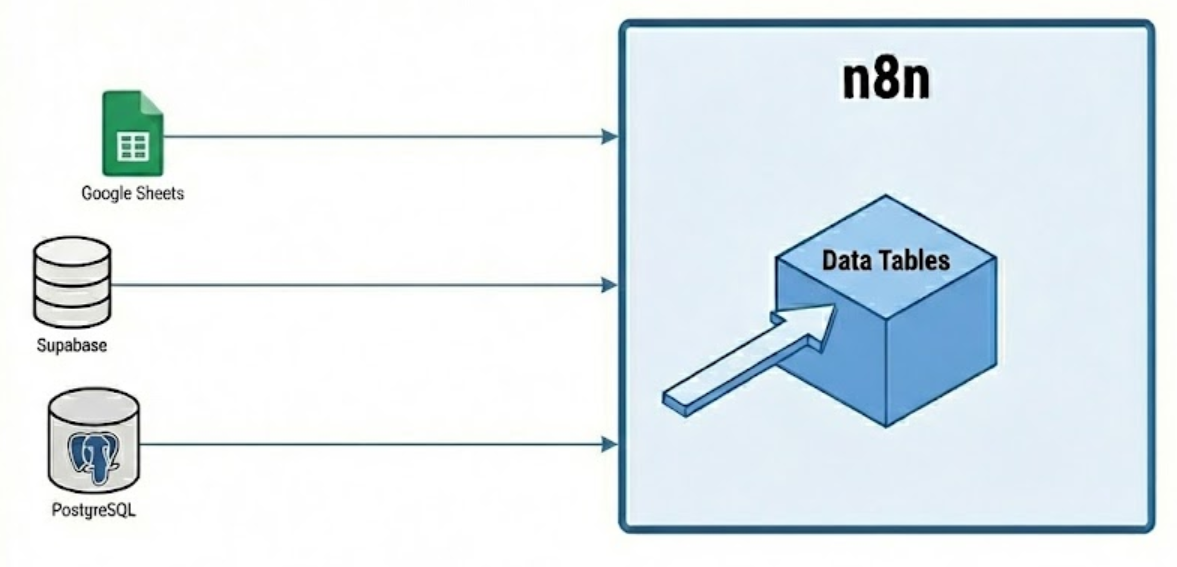
For the last decade, the low-code automation landscape (dominated by Zapier, Make, and early n8n) operated on a purely kinetic model. These platforms were designed to move data from point A to point B, but they were fundamentally forgetful. They remembered nothing of the transaction the moment it finished.
This "stateless" architecture forced engineering teams into a corner. To track even basic history—like "have we seen this lead before?" or "what was the last thing the customer said?"—teams had to stitch together a patchwork of external dependencies. We saw fragile architectures held together by Redis instances, PostgreSQL databases, or Google Sheets acting as production backends.
This is a hidden tax on your organization that manifests as:
- Latency: Unnecessary API round-trips to check external records.
- Fragility: Pipelines breaking because a 3rd-party API hit a rate limit.
- Credential Fatigue: Managing security roles for databases that shouldn't exist.
With the release of native Data Tables, n8n has effectively internalized the state layer. This is not merely a feature update; it is an architectural pivot that transforms the platform from a "router" into a complete "application builder."
Here is the strategic analysis you need to guide your technical/AI leadership.
1. The Strategic Pivot: Internalizing Memory
We are witnessing a shift from "Routing" to "Reasoning." In the era of GPT-5.x and Gemini 3.x, automation is no longer just about moving a JSON blob from a Webhook to a CRM. It is about maintaining context over long lifecycles to enable decision-making.
The Evolution of the Stack
- Old Model (Kinetic & Stateless):
- Trigger: Webhook receives a support ticket.
- Action: Send to Zendesk.
- Flaw: The system has no idea if this user emailed five times in the last hour. It blindly executes, creating noise and cost.
- New Model (Stateful & Agentic):
- Trigger: Webhook receives a support ticket.
- State Check: Query internal
Ticket_Historytable. - Reasoning: "User has submitted 3 tickets in 10 minutes. This is an escalation."
- Action: Route to "Urgent" Slack or Teams channel and update the internal state to 'Escalated'.
The "So What" for Executives
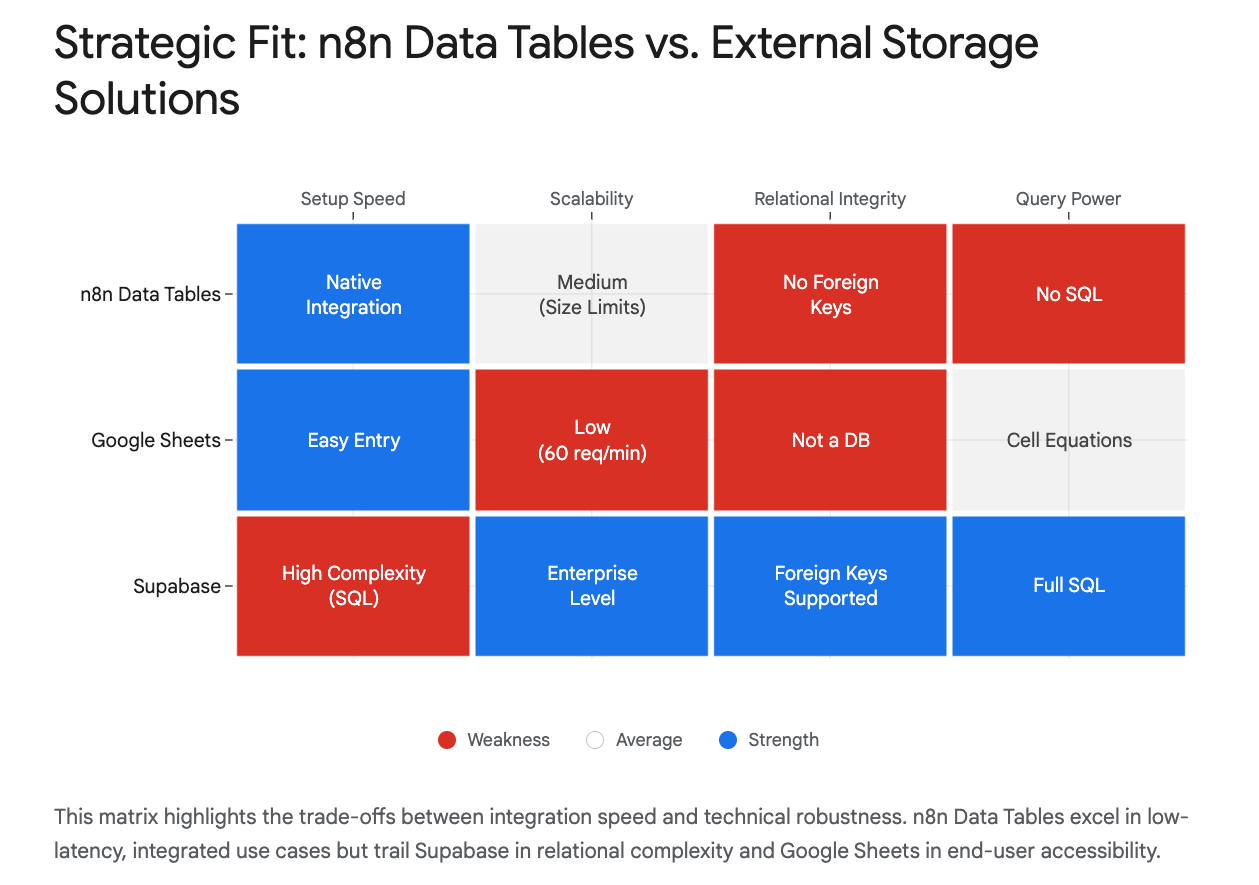
By embedding a persistence layer directly into the execution engine, we eliminate the need for external "glue" databases for a big chunk of logical tasks. This is a direct application of the MED Protocol (Minimum Effective Dose). We achieve the desired outcome (stateful tracking) without the overhead" of provisioning, securing, and maintaining a separate database instance for what amounts to a simple lookup list. This reduces your cloud footprint and your attack surface simultaneously.
2. Operational Hygiene: The "Kill Google Sheets" Mandate
In n8n deployments, a lot of "silent" automation failure is the misuse of spreadsheets as databases. It is a pervasive habit that scales poorly and breaks easily.
The Hidden Risks of Spreadsheet Backends
- Loose Typing (The "N/A" Problem): A sales rep types "TBD" into a
Close_Datecolumn in a shared Google Sheet. Your automation expects a timestamp. The entire Q3 revenue reporting pipeline crashes silently. - API Rate Limits: Google Sheets enforces strict quotas (approx. 60 requests/minute). If your marketing campaign triggers a burst of 500 leads, 440 of them will fail with
429 Too Many Requestserrors. This is revenue leakage caused by poor tooling choices. - Latency: Every read/write to a Google Sheet incurs a network penalty (~500-800ms).
- Uncontrolled sorts: Users can break systems just by sorting a spreadsheet.
- Brittle designs: If your system relies on "column 4"=email address, that's just brittle design.
The n8n Solution: Schema Enforcement
n8n Data Tables solve this via strict Schema Enforcement. Unlike a spreadsheet where a cell can contain anything, these tables enforce strict types (String, Number, Boolean, Date) at the definition level. If a workflow tries to write text into a number field, it fails immediately and visibly at the source, protecting downstream data integrity.
Recommendation:
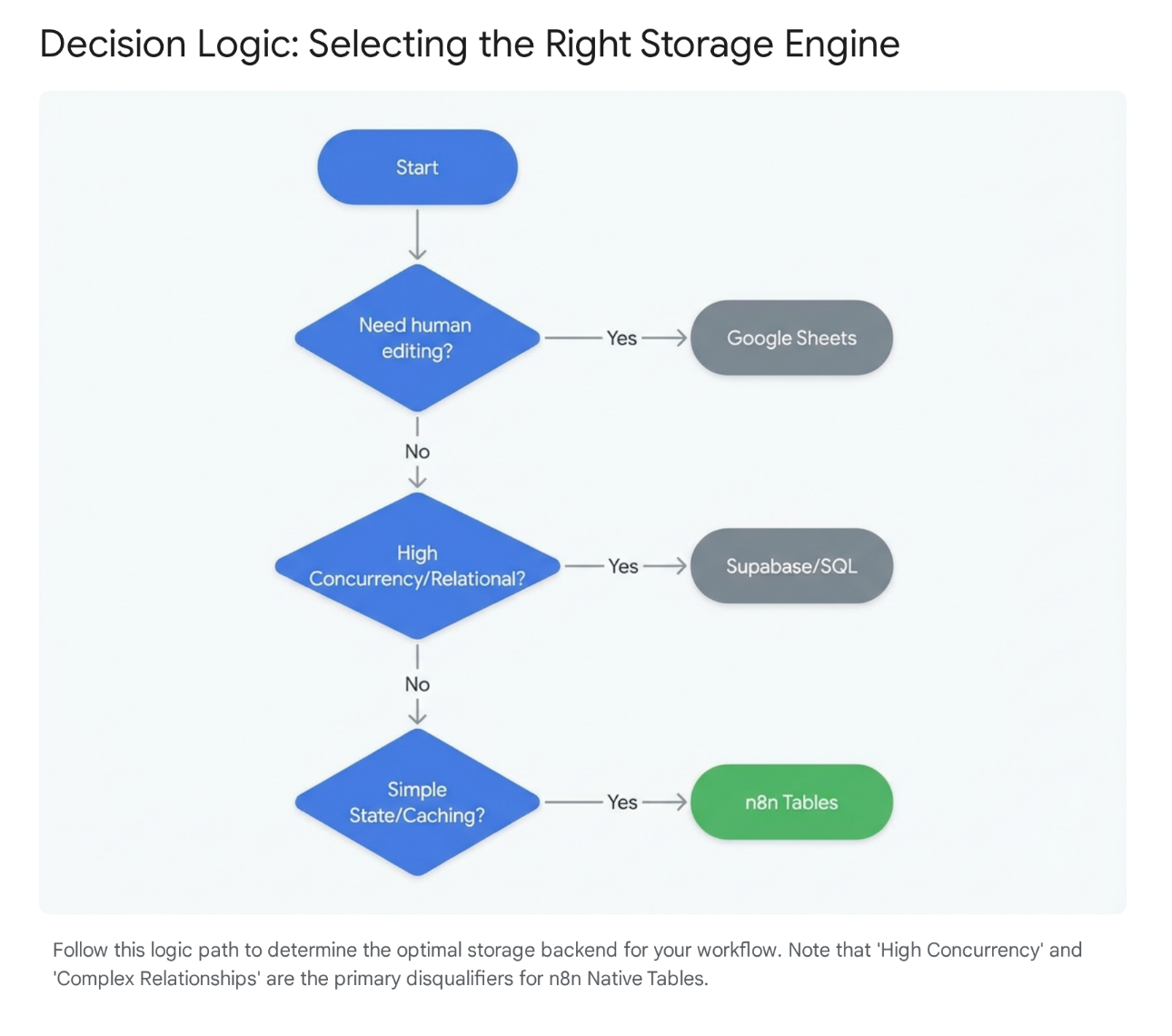
Migrate all "headless" data storage (data read only by machines) out of Google Sheets/Airtable and into internal Data Tables if and when it makes sense.
Business Impact:
- Speed: Latency drops from ~800ms to <10ms.
- Resilience: Internal tables have no rate limits; they are constrained only by server hardware.
- Data Sovereignty: Data never leaves your infrastructure. For GDPR/HIPAA compliance, this eliminates the "Third-Party Processor" risk associated with sending customer PII to a Google Sheet just for temporary processing.
3. The AI Force Multiplier: Context and Deduplication
The most high-leverage application we are seeing in the field is supporting AI Agents. Agents are useless without memory. They need to know what the user asked 5 minutes ago or 5 days ago to provide coherent answers.
Use Case A: The "Poor Man's" chat history
Previously, giving an agent memory required spinning up a chat history database. For many internal use cases, this is massive over-engineering.
- The "Who, Not How" Approach:
- Pattern: Create a simple
Chat_HistoryData Table in n8n. - Execution: Before prompting the LLM, the workflow retrieves the last <n> rows matching the
SessionIDand injects them into the prompt context. - Result: You achieve infinite-context conversations. You avoid the engineering overhead of managing a chat database, and you keep the data entirely in your n8n environment.
- Pattern: Create a simple
Use Case B: The Deduplication Firewall
Marketing teams often burn API credits processing the same lead multiple times from different sources (LinkedIn, Webinar, Email).
- The Pattern: Every incoming lead is checked against a local
Leads_IngestData Table using the "If Row Exists" logic. - The Benefit:
- If it exists: Stop. (Zero API credits used).
- If new: Process and Insert.
- The ROI: This acts as a "Firewall" for your expensive SaaS tools (Salesforce, HubSpot), ensuring only net-new, clean data enters your CRM. This creates immediate Unit Economic Repair by reducing API overages.
4. The Ceiling: When NOT to Use It
We must distinguish between solving existential, complex data problems)and optimizing lightweight storage. n8n Data Tables are for the latter case. They are not a replacement for your core Data Warehouse or high-velocity transactional systems.
The Hard Limits
- Concurrency & Atomic Risks: The current architecture (often SQLite-backed in default deployments) lacks robust exposure of atomic transactions. If two parallel workflows try to update the same "Inventory Count" simultaneously, you risk race conditions (e.g., selling the same concert ticket twice).
- Rule: Never use Data Tables for financial ledgers or inventory decrementing.
- Relational Complexity: You cannot force a "Child" record to delete when a "Parent" record is deleted. If your business question requires complex SQL joins (e.g., "Show me top 5 customers by LTV vs. Churn Probability"), that data belongs in Supabase, Snowflake, or BigQuery.
- Backup Discipline: These tables live inside the n8n instance. If the instance is destroyed and you are using the default database, the data is lost.
- Mitigation: Production teams must implement a "Backup Workflow" that dumps these tables to S3/cold storage nightly.
Strategic Rule of Thumb:
If the data is transactional financial data or core IP, it goes in an industrial database. If it is operational state (e.g., "Did we email this person yet?", "What was the last error message?"), it goes in n8n Data Tables.
5. Executive Action Plan
Days 1-10: Audit the "Glue"
- Have your Engineering Lead identify every Google Sheet, or Airtable base currently acting as a backend for automation.
- Flag any process where PII (Personally Identifiable Information) is leaving your environment solely for temporary storage.
Days 11-20: Apply the MED Protocol
- Migrate State: Move all simple "State Tracking," "Deduplication," and "Chat History" logic into n8n Data Tables.
- Implement "Project Isolation": Ensure specific Data Tables are scoped to specific projects (e.g., HR Data tables are invisible to Marketing projects). This prevents internal data leaks—a common oversight in shared database environments.
Days 21-30: Establish Governance
- Define the "Hard Ceiling." Make it clear to developers: No financial transactions in Data Tables.
- Set up the automated backup workflows to ensure operational resilience.
Final Thought:
Perfection is the enemy of profitable system design. We don't need a perfect enterprise data architecture for a simple lead routing script; we need a solution that works, costs $0 in extra SaaS fees, and doesn't break when a 3rd party changes an API rate limit. This architectural shift gets us there.
What are you going to build with n8n Data Tables first?
Troy