Deep Research Factory: System Architecture Guide
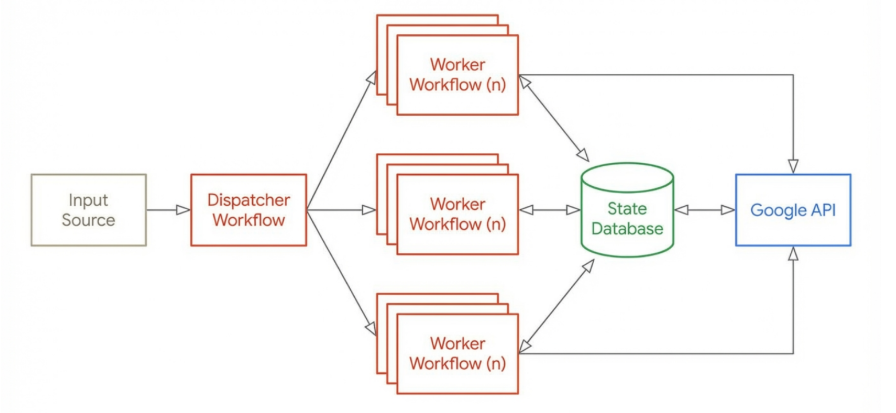
This post outlines the detailed technical requirements and architectural patterns for building a massively parallel research engine using n8n and the Google Interactions API to access Google Gemini Deep Research.
1. Core Concept: Asynchronous Polling
The transition from standard Large Language Models (LLMs) to Agentic workflows necessitates a fundamental shift in integration architecture. Standard synchronous HTTP requests (Request -> Wait -> Response) are designed for millisecond or second-level latency. They inevitably fail with the Deep Research agent due to its extended execution times, which can range from 2 to 15 minutes depending on the complexity of the inquiry. Most HTTP clients and API gateways enforce timeouts (typically 30–60 seconds), meaning the connection would be severed long before the agent completes its reasoning chain.
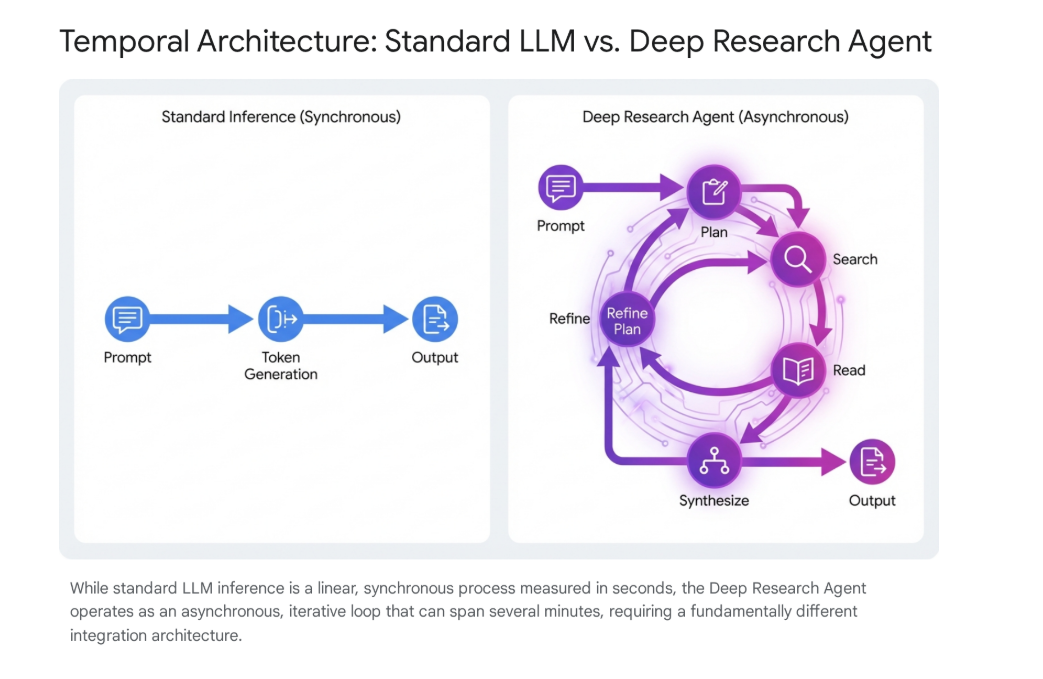
To solve this, this factory employs a stateful polling architecture, decoupling the initiation of work from the retrieval of results.
- Paradigm: Fire-and-Forget + Polling LoopInstead of holding a connection open, the system fires a creation request and immediately disconnects. It then enters a separate cycle of checking status updates. This allows a single n8n instance to manage hundreds of concurrent tasks without blocking its execution threads on idle waiting.
- Key API Requirement: background: trueAll interaction creation requests must strictly include the parameter background: true. Omitting this forces a synchronous attempt, which will trigger immediate timeouts and potentially stall the orchestration engine. This flag tells Google's servers to queue the task for asynchronous processing, returning a resource ID instead of the final text.
2. System Components
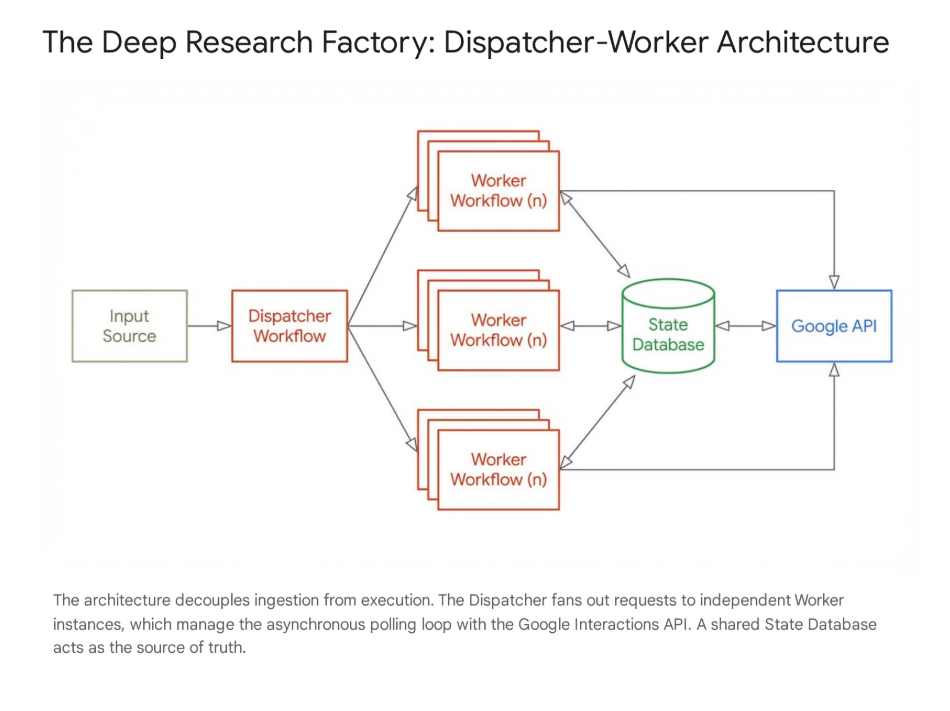
A. The Database (State Layer)
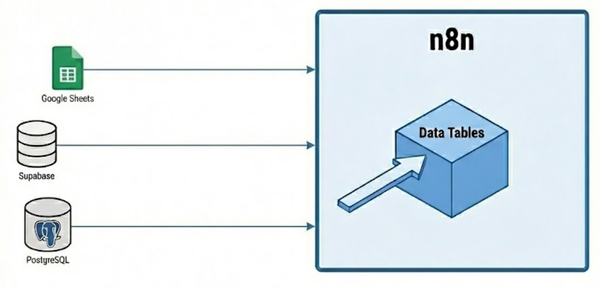
- Role: The "Source of Truth"In a high-throughput factory, the state of any given task must live outside the orchestration engine. n8n execution data is ephemeral; if a server restarts, updates, or crashes during a long-running batch, all in-memory progress is lost. The database provides a persistent, immutable record of every research job, ensuring that no task is lost in the "digital ether" regardless of infrastructure volatility.
- Tech Recommendations: PostgreSQL is preferred for its robust locking and transactional integrity, though Supabase is an excellent alternative for rapid development.
- Key Schema Concepts:
- Auditability: Timestamps (
created_at,updated_at) are crucial for debugging "stuck" jobs. - Cost Tracking: A
token_usagecolumn allows for retrospective cost analysis per client or project. - Error Logging: A dedicated
error_logtext column captures API failure messages, allowing engineers to diagnose systemic issues (e.g., "Invalid API Key" vs. "Quota Exceeded") without digging through server logs.
- Auditability: Timestamps (
B. The Dispatcher (Manager Workflow)
- Responsibility: Ingestion, De-duplication, and Rate Limiting.The Dispatcher acts as the "Traffic Controller" for the factory. It protects the downstream API from being overwhelmed and ensures the factory operates within economic and technical limits.
- Logic Breakdown:
- Ingest: The workflow accepts data from various sources—bulk CSV uploads, Google Sheets rows, or incoming Webhook triggers. It normalizes this input into a standard JSON format containing at least a
topicand aunique_request_id. - Filter (De-duplication): Before processing, the Dispatcher queries the database to see if this specific topic has been researched recently (e.g., within the last 30 days). This step is critical for cost saving; researching "Competitors of Stripe" twice costs double (~$6.00) but yields identical value.
- Log: Valid, new topics are inserted into the database immediately with a status of
PENDING. This creates a permanent record of intent before any API calls are made. - Throttle (Traffic Shaping):
- Mechanism: The "Split in Batches" node is used to chunk the list of pending tasks. A batch size of 5 is recommended.
- Rate Limiting: A "Wait" node configured for 60 seconds is placed inside the batch loop. This limits the initiation rate to 5 tasks/minute (300/hour), smoothing out the traffic spikes that often trigger Google's "429 Too Many Requests" errors.
- Trigger: The workflow calls the Worker workflow using the "Execute Workflow" node. Crucially, this must be set to "Fire and Forget" mode (uncheck "Wait for Workflow"). This allows the Dispatcher to trigger the batch and immediately loop back to wait, rather than stalling for 15 minutes while the workers finish.
- Ingest: The workflow accepts data from various sources—bulk CSV uploads, Google Sheets rows, or incoming Webhook triggers. It normalizes this input into a standard JSON format containing at least a
C. The Worker (Researcher Workflow)
- Responsibility: Lifecycle management of a single research task.This workflow is the "Unit of Work." It is stateless in design but updates the stateful database at every significant transition.
- Phases:
- Initiation:
- Action: Sends a POST request to
https://generativelanguage.googleapis.com/v1beta/interactions. - Payload: Must define the specific model agent (
deep-research-pro-preview-12-2025) and the user's prompt. - State Update: Upon success, it receives a resource name (e.g.,
interactions/123...). It immediately updates the local database row with thisinteraction_idand transitions the status toRUNNING.
- Action: Sends a POST request to
- Polling Loop:
- Wait Strategy: The loop begins with a 45-second Wait. This interval is optimized to balance latency against API quota usage. Polling every 5 seconds is wasteful; polling every 5 minutes delays results.
- Status Check: It performs a GET request to the resource URL
.../interactions/{id}. - Branching Logic:
- IF
COMPLETED: Break the loop and proceed to the Completion phase. - IF
FAILED: Break the loop, log the error message from the API, and update the DB status toFAILED. - IF
IN_PROGRESS: Loop back to the Wait node.
- IF
- Safety Guard ("Zombie Killer"): A "Loop Counter" node increments with each pass. If the loop count exceeds 60 (indicating ~45 minutes of runtime), the workflow assumes the task is "zombie" (stuck on the server side). It forces a failure to free up resources and prevent infinite execution.
- Completion:
- Extraction: The API returns a complex object. The final report is typically located in the last entry of the
outputsarray. The workflow must parse this JSON path securely. - Finalization: The extracted text is saved to the
report_bodycolumn in the database, and the status is updated toCOMPLETED. Optional notification steps (Slack, Email) can be triggered here.
- Extraction: The API returns a complex object. The final report is typically located in the last entry of the
- Initiation:
3. Economic & Error Controls
Budget Gating
- Cost Implication: Deep Research is expensive, estimated at $2.00 - $3.00 per task due to the high volume of "thinking tokens" and search queries generated. A runaway loop or an accidental bulk upload of 1,000 rows could result in a $3,000 bill in under an hour.
- Control Mechanisms:
- Daily Cap: The Dispatcher must perform a
COUNTquery on the database for tasks created in the last 24 hours. If this count exceeds a safety threshold (e.g., 50 tasks), the workflow should halt and alert an admin. - Human-in-the-Loop: For batches larger than 10, the system should pause and require a manual button press (via Slack or Email confirmation) to proceed, displaying the estimated cost.
- Daily Cap: The Dispatcher must perform a
Error Handling Strategy
- 429 (Rate Limit / Quota Exceeded):
- Cause: Too many concurrent "thinking" processes or search tool requests.
- Action: Exponential Backoff. Do not fail immediately. Route the workflow to a separate Wait node (e.g., 5 minutes), then retry the polling or creation request.
- 400/403 (Bad Request / Permission Denied):
- Cause: Invalid API key, malformed JSON, or requesting a model not available in the region.
- Action: Fail Fast. These errors are terminal and will not resolve with time. Log the specific error to the DB
error_logand mark the taskFAILED.
- 500 (Internal Server Error):
- Cause: Temporary glitch on Google's side.
- Action: Limited Retry. Retry the request up to 3 times with a 60-second delay. If it persists, mark as
FAILED.
4. API Configuration Details
- Endpoint:
https://generativelanguage.googleapis.com/v1beta/interactions- Note: This is a specific endpoint for the Interactions API, distinct from the standard
generateContentendpoint used for Gemini Flash/Pro.
- Note: This is a specific endpoint for the Interactions API, distinct from the standard
- Model Identifier:
deep-research-pro-preview-12-2025- This ID is subject to change as the preview evolves; ensure this is a configurable variable in your n8n workflow.
- Authentication:
- Requires
x-goog-api-keyheader. - Service Account Recommendation: For enterprise deployments, avoid personal API keys. Use a Google Cloud Service Account with the "Generative Language API User" role to ensure logs are tied to a system identity.
- Requires
- Data Retention & Privacy:
- Policy: Google stores interaction history to maintain state. Paid tiers retain data for 55 days; free tiers for 1 day.
- Mitigation: If processing sensitive corporate data (IP, PII), the Worker workflow should include a DELETE request to the interaction endpoint immediately after the report is successfully saved to the local database. This ensures the data resides only in your controlled infrastructure.